Custom Plugin Development
Build purpose-specific functionality as an installable WordPress plugin instead of placing permanent business logic inside the theme.

I’m Kashif Mahmood, a WordPress plugin developer building secure, maintainable solutions for business workflows, WooCommerce pricing, external data, admin tools, bookings, downloads, redirects and functionality that an off-the-shelf plugin cannot handle properly.
My WordPress plugin development services connect the feature you need with the way your website already works. That can mean creating a custom plugin from the ground up, extending WooCommerce or MotoPress, integrating an API or Google Sheet, or repairing an existing plugin without rebuilding the entire website.
Share the workflow, website URL and expected result. I’ll help define the practical scope before development begins.
WordPress plugin development services create or extend website functionality without placing fragile business logic inside the theme. A custom plugin can add WooCommerce rules, connect external systems, automate administration, validate customer input, manage private data, build dashboards or introduce a workflow designed specifically for the business.
A good solution is not simply a large PHP file that works once. It should use WordPress and WooCommerce hooks appropriately, validate permissions and input, escape output, protect sensitive actions with nonces, store only necessary data and remain understandable when the website, theme or related plugins change.
The scope can range from a focused internal tool to a customer-facing WooCommerce system. Each feature is planned around users, data, permissions, integrations and the website environment where it must operate.
Build purpose-specific functionality as an installable WordPress plugin instead of placing permanent business logic inside the theme.
Add pricing rules, product logic, checkout fields, rental workflows, order data, customer validation and integrations around WooCommerce.
Connect WordPress with approved APIs, Google Sheets, CRMs, fulfilment systems or other structured data sources.
Extend an existing plugin through supported hooks and add-ons where possible, reducing the risks created by editing vendor files directly.
Create clear settings pages, filters, reports and management screens so staff can control the feature without touching code.
Build validated CSV workflows, scheduled processes, backups and repeatable data-management tools for operational tasks.
Investigate errors, conflicts, deprecated code, failed integrations and behavior that changed after WordPress or related plugin updates.
Apply capability checks, sanitization, nonces, secure file handling, minimal data collection and suitable retention controls.
Support tested changes as the business workflow, WordPress core, WooCommerce and connected services evolve.
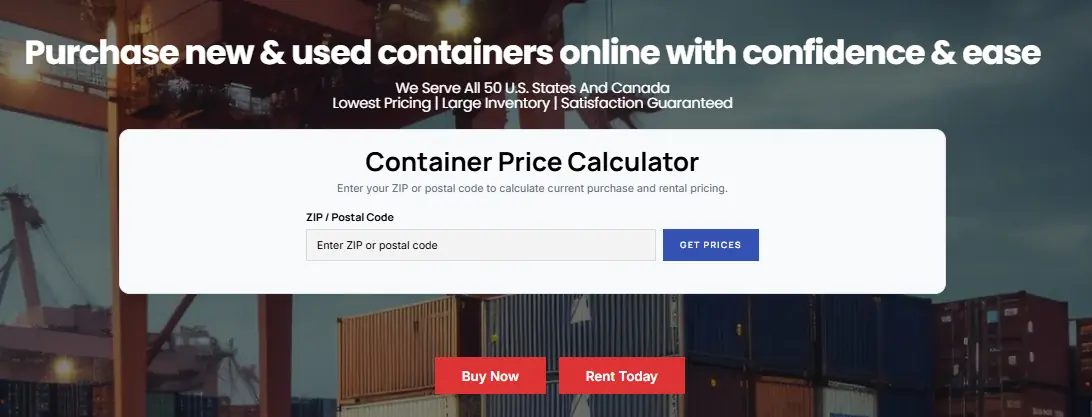
I developed a custom WooCommerce pricing workflow for a container business serving purchase and rental customers across different locations. A customer enters a ZIP or postal code, and the system retrieves the relevant live pricing data used for the available product and transaction path.
The plugin connects WordPress with a controlled Google Sheet, allowing authorized staff to maintain location-based values without editing product code. The WordPress settings screen validates the service-account connection and stores the required credentials securely rather than exposing them on the public page.
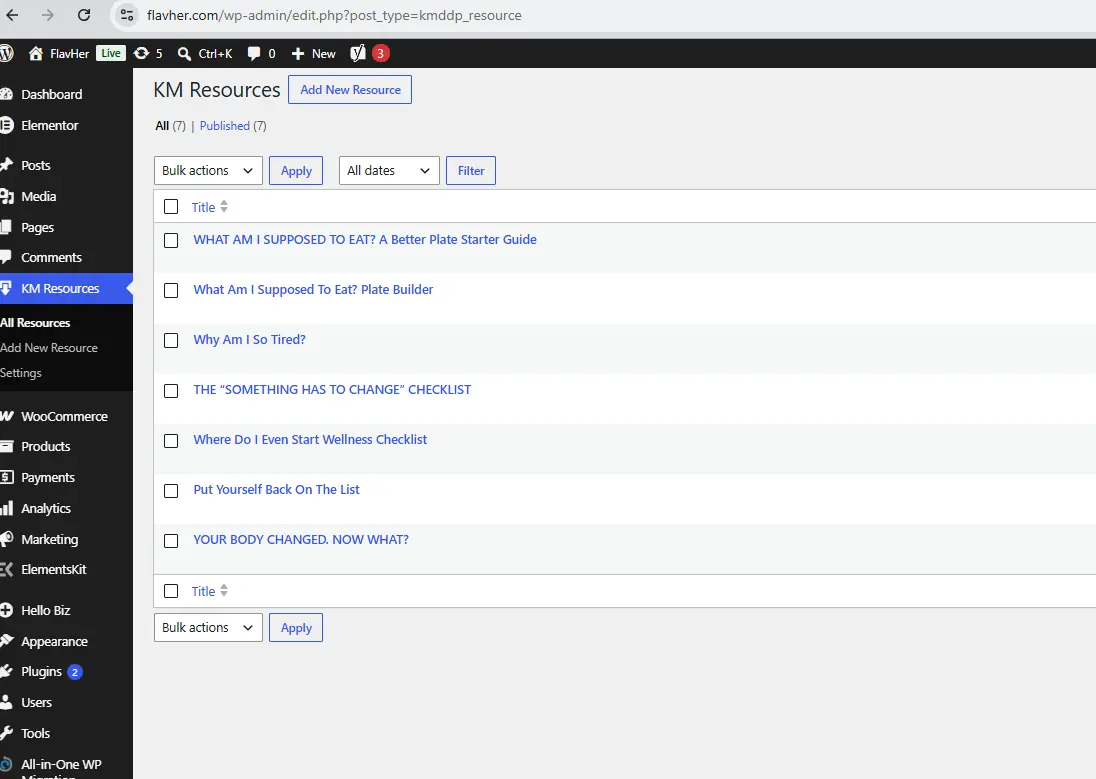
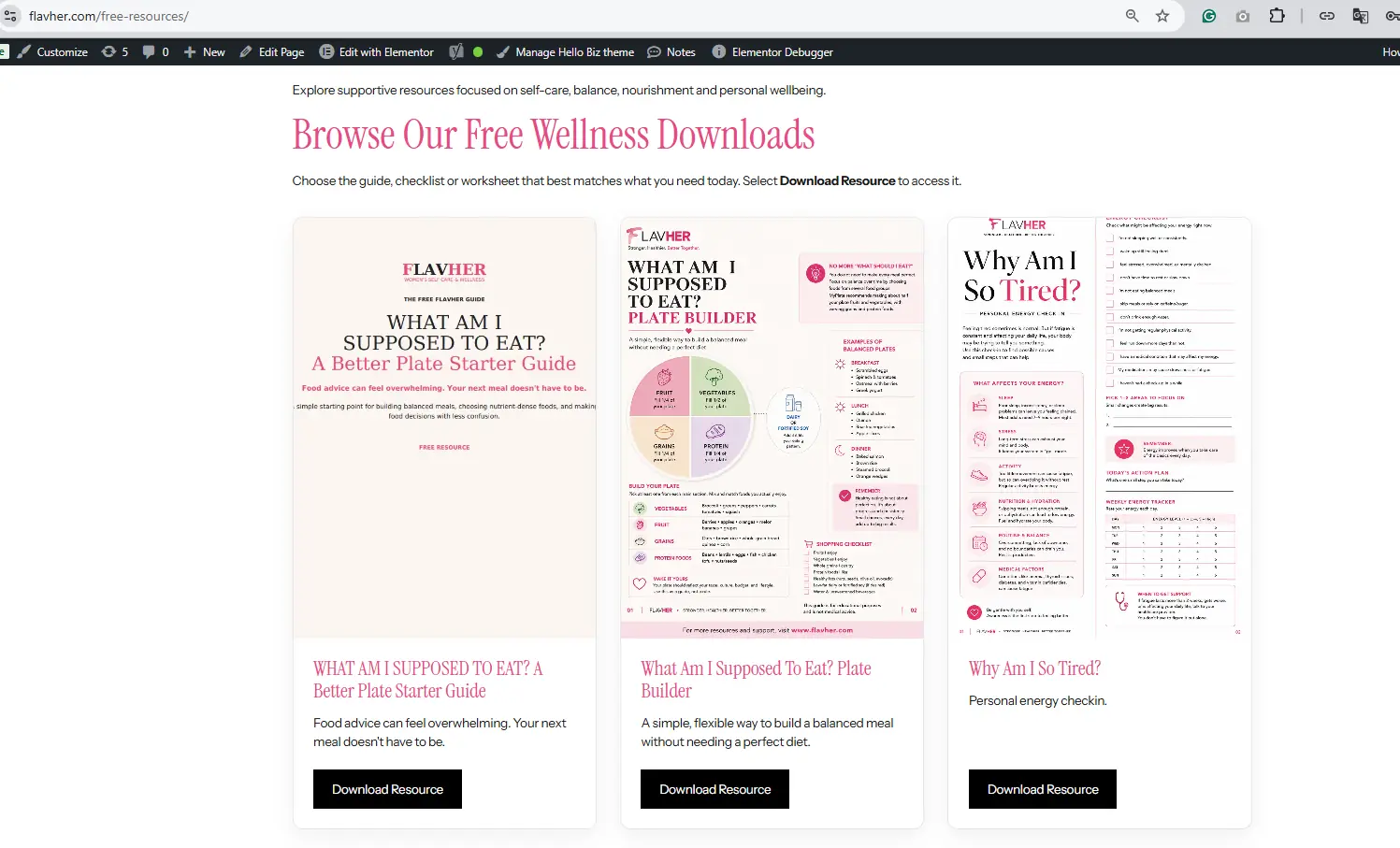
This custom WordPress plugin gives a site owner a dedicated Resources area for managing free guides, checklists and downloads. Each resource can be added through WordPress with its title, description, image and destination, while the public page displays a structured responsive grid.
The solution separates reusable resource data from page-builder content. That makes ongoing updates easier and avoids manually rebuilding cards each time a new download is published.
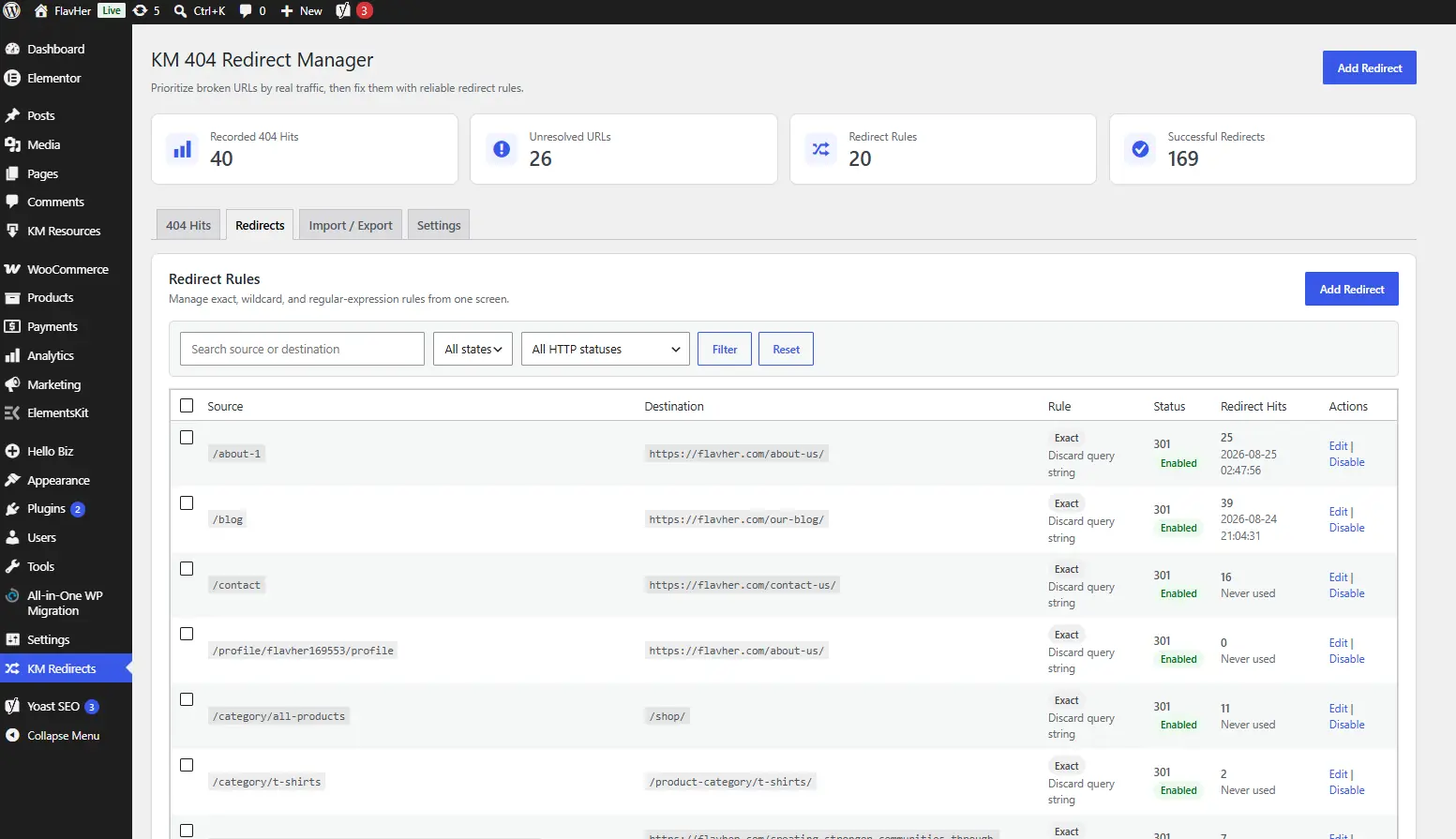
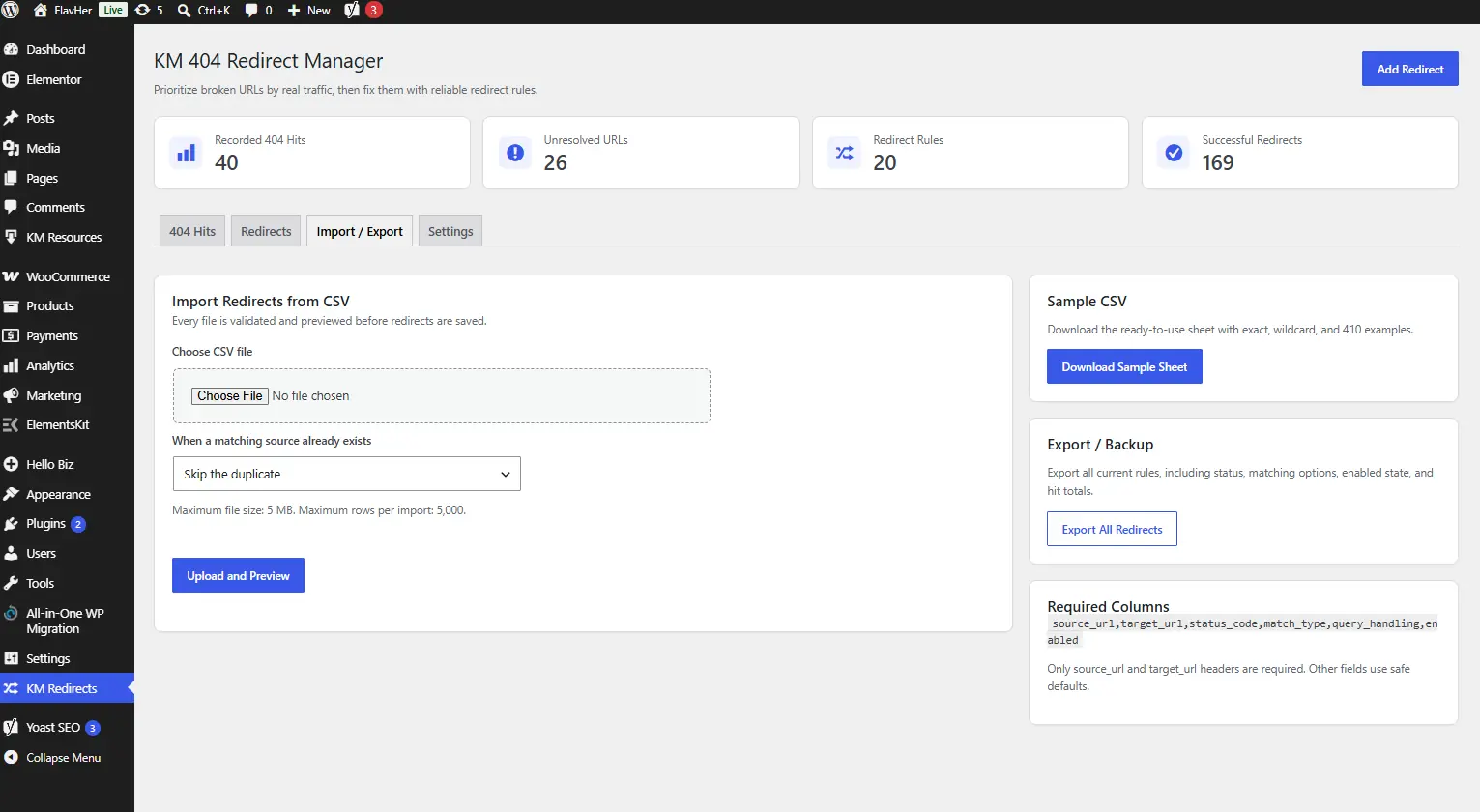
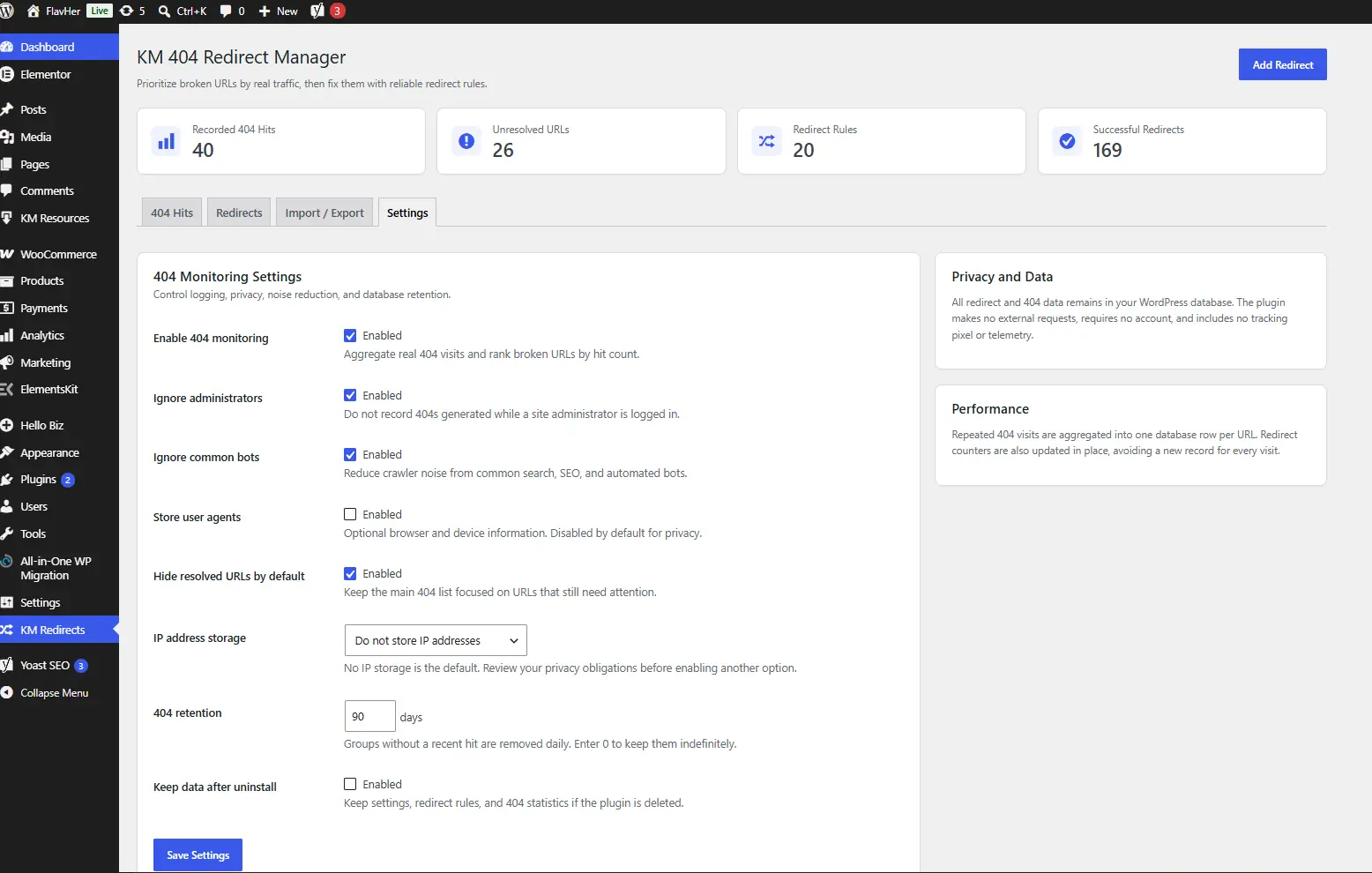
I built this plugin to help WordPress administrators identify broken URLs receiving real visits and prioritize the redirects that matter. It records useful 404 activity, separates unresolved URLs from completed work and manages exact, wildcard or regular-expression redirect rules.
The workflow includes filters, hit counts, source and destination management, CSV import and export, a sample sheet, privacy settings and database-retention controls. The aim is to turn a noisy 404 list into an actionable website-maintenance process.
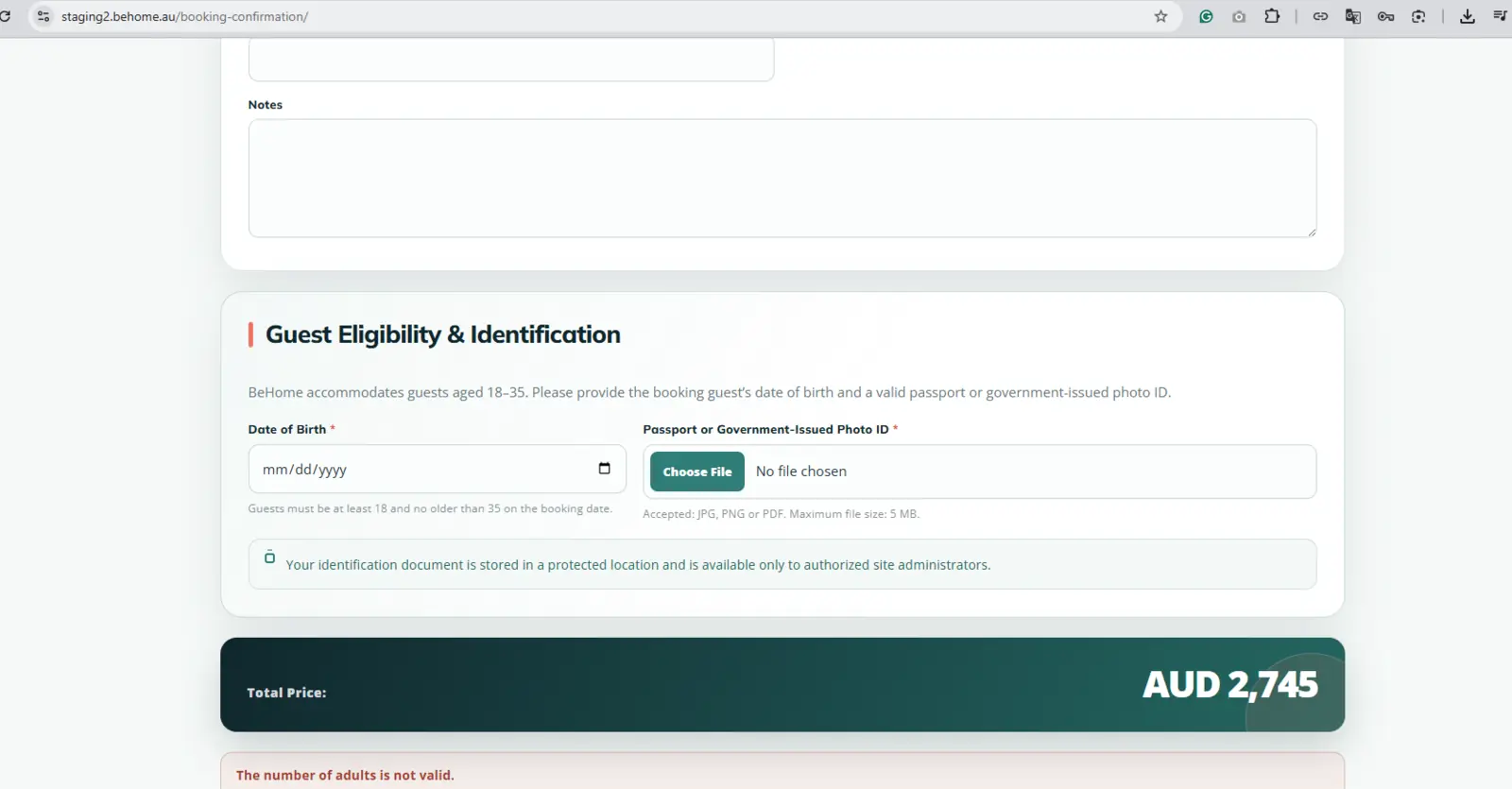
For an accommodation website using MotoPress Hotel Booking, I developed an eligibility extension for an age-restricted booking workflow. Guests provide their date of birth and a passport or government-issued photo ID during booking, with clear validation and accepted file guidance.
The uploaded identification is made available to authorized administrators from the corresponding booking record. This keeps the customer step connected with the existing reservation process instead of requiring a disconnected form or manual email exchange.
Clear requirements reduce rework. The process defines what the plugin must do, who can use it, what data it needs and how success will be checked before unnecessary complexity is added.
Document the users, inputs, rules, outputs, exceptions, permissions and current manual process.
Check WordPress, hosting, theme, plugins, WooCommerce data and any external systems the feature must use.
Develop the feature with suitable hooks, settings, validation, error handling and upgrade-safe separation.
Test normal and edge cases, verify permissions and provide practical instructions for the agreed workflow.
Not sure whether you need a plugin? A focused website and technical audit can identify whether the requirement is best solved through configuration, an existing integration or custom development.
Custom development is valuable when the requirement is genuinely specific. It should not be the automatic answer when a reliable existing solution already covers the workflow.
| Approach | Best suited for | Main advantage | Important limitation |
|---|---|---|---|
| Custom WordPress Plugin | Unique rules, integrations, private workflows or platform extensions | Designed around the exact business process and website data | Requires defined scope, testing and future maintenance |
| Existing Plugin | Common requirements already served by a reliable product | Faster setup with established documentation and updates | May include unnecessary features or lack a critical rule |
| Existing Plugin Add-on | Extending WooCommerce, MotoPress or another supported platform | Keeps the core product intact while adding focused behavior | Depends on the parent plugin’s hooks and future compatibility |
| Theme or functions.php Code | Small presentation behavior closely tied to the current theme | Can be appropriate for a limited theme-specific adjustment | Business functionality may be lost or become fragile when the theme changes |
A custom feature often handles customer input, orders, files or operational data. Development choices must consider more than the visible button or form.
Use appropriate APIs, hooks, capabilities, nonces, sanitization and output escaping for the feature being built.
Keep custom functionality outside vendor and theme files so updates are less likely to overwrite the work.
Give authorized staff clear controls, useful validation and understandable feedback rather than developer-only interfaces.
Collect and retain only what the workflow needs, with suitable permissions and clear privacy considerations.
Custom plugin work can be combined with my WordPress website development, Elementor development and website maintenance services when the requirement affects the wider site. For search visibility beyond the plugin itself, see my SEO, AEO and GEO services.
This service page explains the work with direct definitions, specific examples, visible screenshots, clear limitations and consistent information about the developer. Those elements help potential clients evaluate the service and make the page easier for search and answer systems to understand.
The page does not use hidden keyword blocks or unsupported claims. The primary search topic is WordPress plugin development services, while supporting sections naturally cover custom WordPress plugin development, WooCommerce extensions, integrations, plugin customization and hiring questions.
Search visibility still depends on indexing, competition, website authority, content quality, internal links and external signals. No page structure, schema type or keyword placement can guarantee a ranking or AI citation.
Trust and clarity signals
Project screenshots show the functionality; client feedback provides context about communication, reliability and working experience.
Client video testimonial
Client video testimonial
Client video testimonial
Review more client testimonials, see additional work in my portfolio, or learn more about my experience. You can also verify public feedback on Upwork and Fiverr.
Answers about custom plugins, WooCommerce extensions, APIs, pricing, ownership, security, updates and hiring a WordPress plugin developer.
A WordPress plugin developer creates, extends, tests and maintains functionality that operates through WordPress. The work can involve PHP, JavaScript, databases, REST APIs, admin screens, permissions, scheduled actions, WooCommerce hooks, external integrations and compatibility with the existing website.
Custom development is suitable when the website has a specific business rule, integration or workflow that reliable existing plugins cannot provide without major compromises. The requirement should be defined clearly enough to justify the development and future maintenance.
Yes. Custom WooCommerce work can cover product and pricing logic, checkout fields, customer validation, order metadata, rental workflows, imports, reports and external-system integrations. The exact approach depends on the products, checkout flow, payment method and other extensions already installed.
Yes, when the external service provides a suitable and authorized connection method. A plugin can retrieve or send structured data, validate credentials, cache appropriate responses and provide administrators with connection and error information. API limits, security and data ownership must be considered during planning.
I can review an existing plugin and determine whether the requirement can be added through documented hooks, an extension plugin or another upgrade-aware method. Editing the vendor’s files directly is usually avoided because an update can overwrite the changes.
Yes, after reviewing the source code, error information, WordPress environment and expected behavior. Some problems require a focused compatibility correction, while poorly structured or insecure code may be safer to refactor or rebuild. The review determines the practical option.
Ownership and permitted use should be agreed before work begins, especially when the project includes third-party libraries, commercial APIs or licensed platform code. Your proposal can state the deliverables, source-code access, licensing conditions and whether the plugin is for one site or wider distribution.
Cost depends on the number of workflows, admin screens, integrations, data rules, permissions, edge cases, testing and documentation required. A focused internal tool costs less than a commercial plugin or a complex WooCommerce system. Share the requirement so the scope can be estimated accurately.
A small, clearly defined plugin may be completed relatively quickly, while integrations, ecommerce rules, file handling and multi-step workflows need more planning and testing. The timeline is estimated after the requirements, website environment and external dependencies are reviewed.
When comparing a WordPress plugin development company or WordPress plugin developers for hire, review relevant code-based work rather than design examples alone. Prepare a simple description of the current process, users, inputs, expected output and connected systems. Include your website URL and examples so the developer can identify missing decisions, technical risks and an appropriate first milestone.
Share what the website does now, what should happen instead, who will use the feature and any plugin or external system involved. I’ll review the request and recommend the most practical next step.
Use the existing footer form and include your website URL, required workflow and examples. A clear description helps produce a more accurate scope.
